"think" tool:让 Claude 在复杂工具使用场景中停下来思考
原文: English original · Anthropic/OpenAI 官方
“think” tool:让 Claude 在复杂工具使用场景中停下来思考
发布于 2025 年 3 月 20 日
一种新工具,可提升 Claude 解决复杂问题的表现
扩展思考更新
2025 年 12 月 15 日
自本文初次发布以来,扩展思考(extended thinking)能力已经有所改进,因此在大多数情况下,我们建议使用扩展思考,而不是专门的 “think” tool。扩展思考能带来类似收益,也就是给 Claude 留出空间推理复杂问题,同时具备更好的集成度和性能。实现细节请参阅我们的扩展思考文档。
随着我们持续增强 Claude 解决复杂问题的能力,我们发现了一种特别有效的方法:“think” tool。它会在复杂任务中为结构化思考创建一块专用空间。
正如下文会解释的,这项简单却强大的技术不同于 Claude 新的“扩展思考”能力(扩展思考实现细节见此处),但它显著提升了 Claude 的 agentic 工具使用能力,包括遵循政策、做出一致决策,以及处理多步骤问题,而且实现开销很低。
本文将介绍如何在不同应用中实现 “think” tool,并基于经过验证的基准测试结果,为开发者分享实用建议。
什么是 “think” tool?
通过 “think” tool,我们赋予 Claude 一种能力:在得出最终答案的过程中,额外加入一个思考步骤,并拥有一块指定的专用空间。
它听起来类似于扩展思考,但两者是不同概念。扩展思考关注的是 Claude 在开始生成响应之前会做什么。使用扩展思考时,Claude 会在行动前深入考虑并迭代自己的计划。而 “think” tool 面向的是 Claude 已经开始生成响应之后,让它增加一个步骤,停下来思考自己是否已经拥有继续推进所需的全部信息。
在执行长链条工具调用,或与用户进行漫长的多步骤对话时,这一点尤其有用。
因此,“think” tool 更适合这类场景:Claude 仅凭用户查询本身还不具备组织响应所需的全部信息,需要处理外部信息(例如工具调用结果中的信息)。Claude 通过 “think” tool 进行的推理,不如扩展思考那样全面;它更聚焦于模型新发现的信息。
对于更简单的工具使用场景,例如非顺序工具调用或直接的指令遵循,我们建议使用扩展思考。对于编码、数学和物理等不需要 Claude 调用工具的用例,扩展思考也很有用。
当 Claude 需要调用复杂工具、在长链条工具调用中仔细分析工具输出、在包含详细指南且政策密集的环境中导航,或做出每一步都建立在前一步之上且错误代价很高的顺序决策时,“think” tool 更合适。
下面是一个使用 τ-Bench 标准工具规范格式的示例实现:
{
  "name": "think",
  "description": "Use the tool to think about something. It will not obtain new information or change the database, but just append the thought to the log. Use it when complex reasoning or some cache memory is needed.",
  "input_schema": {
    "type": "object",
    "properties": {
      "thought": {
        "type": "string",
        "description": "A thought to think about."
      }
    },
    "required": ["thought"]
  }
}
在 τ-Bench 上的表现
我们使用 τ-bench(tau-bench)评测了 “think” tool。τ-bench 是一个综合性基准测试,旨在测试模型在真实客服场景中使用工具的能力,其中 “think” tool 是评测标准环境的一部分。
τ-bench 会评估 Claude 的以下能力:
- 在与模拟用户的真实感对话中导航;
- 一贯遵循复杂的客服 agent 政策指南;
- 使用多种工具访问和操作环境数据库。
τ-bench 使用的主要评测指标是 pass^k,它衡量的是:对于给定任务,k 次独立任务试验全部成功的概率,并在所有任务上取平均值。不同于其他 LLM 评测中常见的 pass@k 指标(衡量 k 次试验中至少有一次成功),pass^k 评估的是一致性和可靠性。这些品质对客服应用至关重要,因为这类应用必须稳定遵守政策。
表现分析
我们的评测比较了几种不同配置:
- Baseline(没有 “think” tool,也没有扩展思考模式)
- 仅使用扩展思考模式
- 仅使用 “think” tool
- “Think” tool 配合优化 prompt(用于航空领域)
结果显示,当 Claude 3.7 有效使用 “think” tool 时,在该基准的“航空”和“零售”两个客服领域都取得了显著提升:
- 航空领域:“think” tool 配合优化 prompt 在 pass^1 指标上达到 0.570,而 baseline 只有 0.370,相对提升 54%;
- 零售领域:仅使用 “think” tool 达到 0.812,而 baseline 为 0.783。
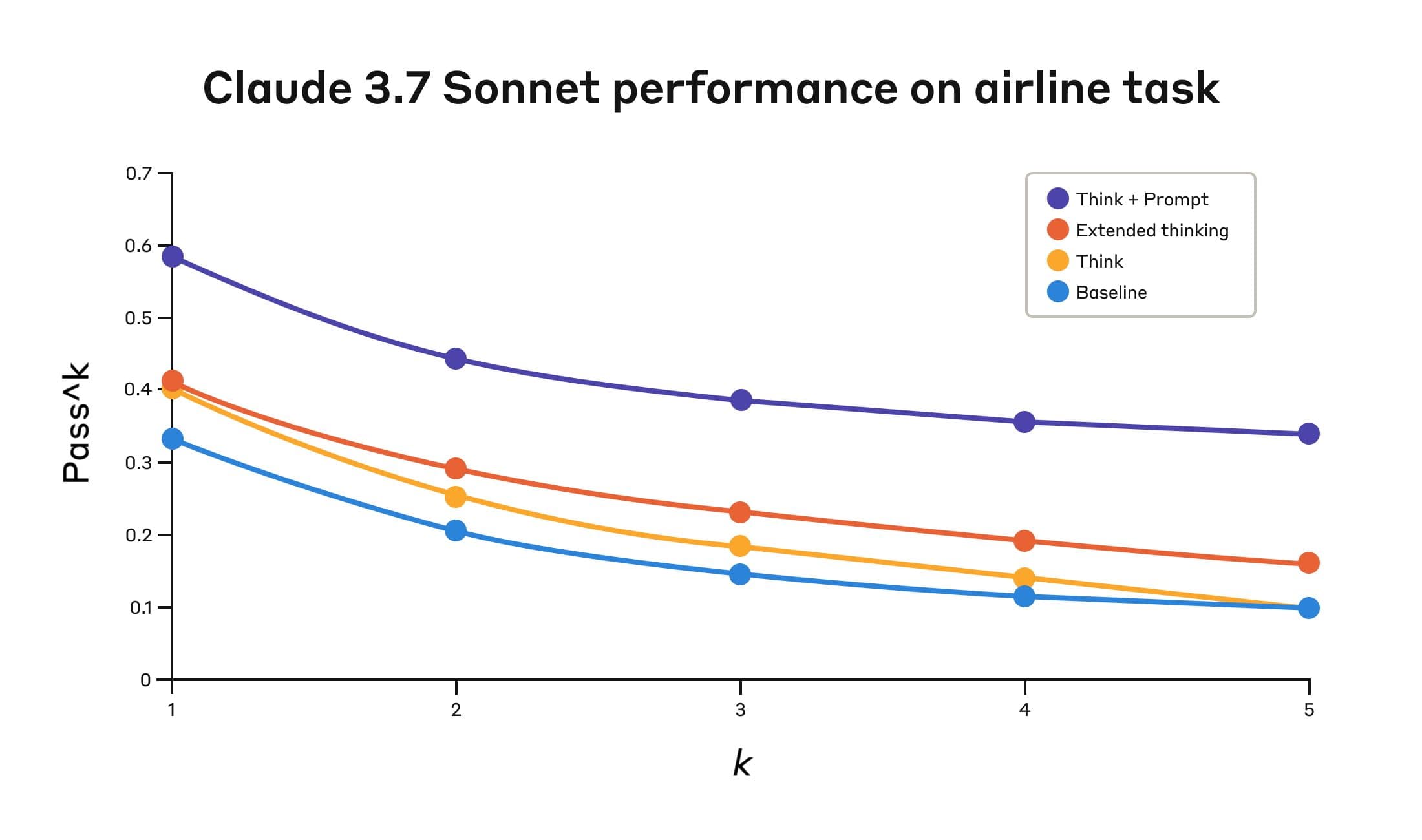
Claude 3.7 Sonnet 在 Tau-Bench 评测的“航空”领域表现
| 配置 | k=1 | k=2 | k=3 | k=4 | k=5 |
|---|---|---|---|---|---|
| “Think” + Prompt | 0.584 | 0.444 | 0.384 | 0.356 | 0.340 |
| “Think” | 0.404 | 0.254 | 0.186 | 0.140 | 0.100 |
| Extended thinking | 0.412 | 0.290 | 0.232 | 0.192 | 0.160 |
| Baseline | 0.332 | 0.206 | 0.148 | 0.116 | 0.100 |
四种不同配置的评测结果。分数为比例值。
航空领域的最佳表现来自将 “think” tool 与优化 prompt 搭配使用;这个 prompt 会给出示例,说明在分析客户请求时应该采用哪些推理方式。下面是优化 prompt 的一个示例:
## Using the think tool
Before taking any action or responding to the user after receiving tool results, use the think tool as a scratchpad to:
- List the specific rules that apply to the current request
- Check if all required information is collected
- Verify that the planned action complies with all policies
- Iterate over tool results for correctness
Here are some examples of what to iterate over inside the think tool:
<think_tool_example_1>
User wants to cancel flight ABC123
- Need to verify: user ID, reservation ID, reason
- Check cancellation rules:
  * Is it within 24h of booking?
  * If not, check ticket class and insurance
- Verify no segments flown or are in the past
- Plan: collect missing info, verify rules, get confirmation
</think_tool_example_1>
<think_tool_example_2>
User wants to book 3 tickets to NYC with 2 checked bags each
- Need user ID to check:
  * Membership tier for baggage allowance
  * Which payments methods exist in profile
- Baggage calculation:
  * Economy class × 3 passengers
  * If regular member: 1 free bag each → 3 extra bags = $150
  * If silver member: 2 free bags each → 0 extra bags = $0
  * If gold member: 3 free bags each → 0 extra bags = $0
- Payment rules to verify:
  * Max 1 travel certificate, 1 credit card, 3 gift cards
  * All payment methods must be in profile
  * Travel certificate remainder goes to waste
- Plan:
1. Get user ID
2. Verify membership level for bag fees
3. Check which payment methods in profile and if their combination is allowed
4. Calculate total: ticket price + any bag fees
5. Get explicit confirmation for booking
</think_tool_example_2>
特别值得注意的是几种方法之间的对比。使用 “think” tool 配合优化 prompt,明显优于扩展思考模式(后者表现与未加 prompt 的 “think” tool 接近)。单独使用 “think” tool(没有 prompt 指导)相比 baseline 能提升表现,但仍低于优化后的方法。
“think” tool 与优化 prompt 的组合以显著优势取得最强表现,原因很可能是该基准的航空政策部分复杂度很高,模型从“如何 think”的示例中受益最大。
在零售领域,我们也测试了多种配置,以了解每种方法的具体影响。
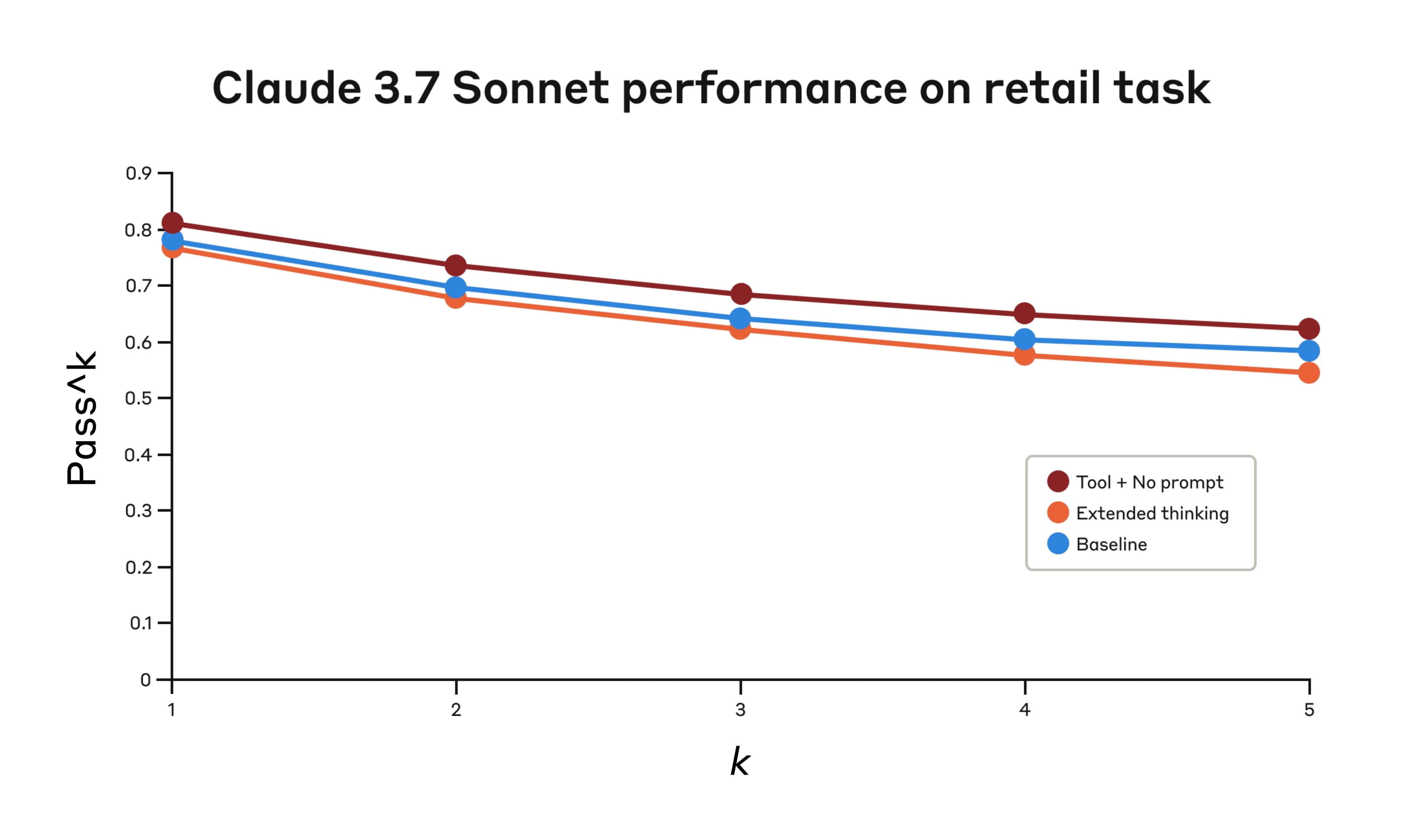
Claude 3.7 Sonnet 在 Tau-Bench 评测的“零售”领域表现
| 配置 | k=1 | k=2 | k=3 | k=4 | k=5 |
|---|---|---|---|---|---|
| “Think” + no prompt | 0.812 | 0.735 | 0.685 | 0.650 | 0.626 |
| Extended thinking | 0.770 | 0.681 | 0.623 | 0.581 | 0.548 |
| Baseline | 0.783 | 0.695 | 0.643 | 0.607 | 0.583 |
三种不同配置的评测结果。分数为比例值。
“think” tool 即使没有额外 prompt,也取得了最高的 pass^1 分数 0.812。相比航空领域,零售政策明显更容易导航;Claude 只要拥有一个思考空间,即使没有进一步指导,也能有所提升。
τ-Bench 分析的关键洞察
我们的详细分析揭示了几种模式,可以帮助你有效实现 “think” tool:
- 在困难领域,prompt 设计影响很大。仅仅让模型可以使用 “think” tool,可能会带来一定提升;但对于困难领域,将它与优化 prompt 搭配,会产生显著更好的结果。不过,较简单的领域可能只需要能访问 “think” 即可受益。
- 跨试验一致性得到改善。使用 “think” 带来的提升在最高 k=5 的 pass^k 上仍然保持,说明该工具帮助 Claude 更有效地处理边界情况和异常场景。
在 SWE-Bench 上的表现
在评测 Claude 3.7 Sonnet 时,我们也把类似的 “think” tool 加入了 SWE-bench 设置中,这帮助其取得了 0.623 的当时最佳成绩。适配后的 “think” tool 定义如下:
{
  "name": "think",
  "description": "Use the tool to think about something. It will not obtain new information or make any changes to the repository, but just log the thought. Use it when complex reasoning or brainstorming is needed. For example, if you explore the repo and discover the source of a bug, call this tool to brainstorm several unique ways of fixing the bug, and assess which change(s) are likely to be simplest and most effective.\nAlternatively, if you receive some test results, call this tool to brainstorm ways to fix the failing tests.",
  "input_schema": {
    "type": "object",
    "properties": {
      "thought": {
        "type": "string",
        "description": "Your thoughts."
      }
    },
    "required": ["thought"]
  }
}
我们的实验(使用 “think” tool 时 n=30 个样本,不使用时 n=144 个样本)显示,单独加入这个工具平均可提升 1.6% 的表现(Welch t 检验:t(38.89) = 6.71,p < .001,d = 1.47)。
何时使用 “think” tool
基于这些评测结果,我们确定了几类 Claude 最能从 “think” tool 中受益的场景:
- 工具输出分析。当 Claude 在行动前需要仔细处理前一次工具调用的输出,并且可能需要回溯自己的方法时;
- 政策密集的环境。当 Claude 需要遵循详细指南并核验合规性时;以及
- 顺序决策。当每个行动都建立在前一步之上,并且错误代价很高时(常见于多步骤领域)。
实现最佳实践
为了让 Claude 充分发挥 “think” tool 的价值,我们根据 τ-bench 实验推荐以下实现实践。
1. 使用领域专属示例进行策略性 prompt 设计
最有效的方法,是提供清晰指令,说明何时以及如何使用 “think” tool,例如 τ-bench 航空领域所使用的指令。提供针对具体用例定制的示例,可以显著提高模型使用 “think” tool 的有效程度:
- 推理过程应达到什么细节程度;
- 如何把复杂指令拆解为可执行步骤;
- 如何为常见场景建立决策树;以及
- 如何检查是否已经收集到全部必要信息。
2. 将复杂指导放在 system prompt 中
我们发现,当关于 “think” tool 的指令较长和/或较复杂时,把它们放在 system prompt 中,比放在工具描述本身里更有效。这种做法提供了更广泛的上下文,也能帮助模型把思考过程更好地整合到整体行为中。
何时不该使用 “think” tool
虽然 “think” tool 能带来实质性提升,但它并不适用于所有工具使用用例,而且会增加 prompt 长度和输出 token。具体来说,我们发现 “think” tool 在以下用例中不会带来改善:
- 非顺序工具调用。如果 Claude 只需要进行单次工具调用,或多次并行调用即可完成任务,那么加入 “think” 不太可能带来提升。
- 简单指令遵循。当 Claude 需要遵守的约束不多,并且默认行为已经足够好时,额外的 “think” 过程不太可能带来收益。
开始使用
“think” tool 可以很直接地加入你的 Claude 实现中,只需几个步骤就可能带来有意义的改进:
- 在 agentic 工具使用场景中测试。从具有挑战性的用例开始,也就是 Claude 目前在政策合规或长工具调用链中的复杂推理方面表现吃力的场景。
- 添加工具定义。实现一个针对你所在领域定制的 “think” tool。它只需要极少代码,却能支持更结构化的推理。也可以考虑在 system prompt 中加入何时以及如何使用该工具的指令,并提供与你的领域相关的示例。
- 监控并优化。观察 Claude 在实践中如何使用该工具,并调整你的 prompt,以鼓励更有效的思考模式。
最好的部分在于,加入这个工具在表现结果上的下行风险很小。除非 Claude 决定使用它,否则它不会改变外部行为,也不会干扰你现有的工具或 workflows。
结论
我们的研究表明,在需要遵守政策并在长链条工具调用中进行推理的复杂任务上,“think” tool 可以显著提升 Claude 3.7 Sonnet 的表现1。“Think” 不是万能解法,但对于正确的用例,它能在实现复杂度很低的前提下带来可观收益。
我们期待看到你如何使用 “think” tool,通过 Claude 构建能力更强、更可靠、更透明的 AI 系统。
虽然我们的 τ-Bench 结果聚焦于 “think” tool 对 Claude 3.7 Sonnet 的提升,但实验显示,Claude 3.5 Sonnet (New) 在与 3.7 Sonnet 相同的配置下也能获得表现提升,这说明这种改进同样可以泛化到其他 Claude 模型。 ↩︎