Desktop Extensions:为 Claude Desktop 一键安装 MCP server
原文: English original · Anthropic/OpenAI 官方
Desktop Extensions:为 Claude Desktop 一键安装 MCP server
发布于 2025 年 6 月 26 日
Desktop Extensions 让安装 MCP servers 像点击按钮一样简单。本文将分享它的技术架构,以及创建优质 extensions 的一些建议。
文件扩展名更新
2025 年 9 月 11 日
Claude Desktop Extensions 现在使用 .mcpb(MCP Bundle)文件扩展名,不再使用 .dxt。现有 .dxt extensions 会继续可用,但我们建议开发者今后为新的 extensions 使用 .mcpb。所有功能保持不变,这只是一次命名约定更新。
去年我们发布 Model Context Protocol (MCP) 之后,看到开发者构建了许多出色的本地 servers,让 Claude 能够访问从文件系统到数据库的各种资源。但我们不断听到同样的反馈:安装太复杂。用户需要开发者工具,必须手动编辑配置文件,而且经常卡在依赖问题上。
今天,我们推出 Desktop Extensions:一种新的打包格式,让安装 MCP servers 变得像点击按钮一样简单。
解决 MCP 安装难题
本地 MCP servers 为 Claude Desktop 用户解锁了强大能力。它们可以与本地应用交互、访问私有数据,并与开发工具集成,同时把数据保留在用户自己的机器上。不过,当前安装流程带来了明显门槛:
- 需要开发者工具:用户需要安装 Node.js、Python 或其他运行时
- 手动配置:每个 server 都需要编辑 JSON 配置文件
- 依赖管理:用户必须解决包冲突和版本不匹配
- 没有发现机制:要找到有用的 MCP servers,必须去 GitHub 搜索
- 更新复杂:要让 servers 保持最新,意味着需要手动重装
这些摩擦点意味着,尽管 MCP servers 很强大,非技术用户却基本难以使用。
介绍 Desktop Extensions
Desktop Extensions(.mcpb 文件)通过把完整的 MCP server 及其所有依赖打包成一个可安装包,解决了这些问题。对用户来说,变化如下:
之前:
# Install Node.js first
npm install -g @example/mcp-server
# Edit ~/.claude/claude_desktop_config.json manually
# Restart Claude Desktop
# Hope it works
之后:
- 下载一个
.mcpb文件 - 双击,用 Claude Desktop 打开
- 点击 “Install”
就是这样。不需要终端,不需要配置文件,也没有依赖冲突。
架构概览
Desktop Extension 是一个 zip 归档文件,里面包含本地 MCP server 和一个 manifest.json。这个文件描述了 Claude Desktop 以及其他支持 desktop extensions 的应用需要知道的一切信息。
extension.mcpb (ZIP archive)
├── manifest.json         # Extension metadata and configuration
├── server/               # MCP server implementation
│   └── [server files]
├── dependencies/         # All required packages/libraries
└── icon.png             # Optional: Extension icon
# Example: Node.js Extension
extension.mcpb
├── manifest.json         # Required: Extension metadata and configuration
├── server/               # Server files
│   └── index.js          # Main entry point
├── node_modules/         # Bundled dependencies
├── package.json          # Optional: NPM package definition
└── icon.png              # Optional: Extension icon
# Example: Python Extension
extension.mcpb (ZIP file)
├── manifest.json         # Required: Extension metadata and configuration
├── server/               # Server files
│   ├── main.py           # Main entry point
│   └── utils.py          # Additional modules
├── lib/                  # Bundled Python packages
├── requirements.txt      # Optional: Python dependencies list
└── icon.png              # Optional: Extension icon
Desktop Extension 中唯一必需的文件是 manifest.json。Claude Desktop 会处理所有复杂性:
- 内置运行时:我们随 Claude Desktop 一起发布 Node.js,从而消除外部依赖
- 自动更新:有新版本时,extensions 会自动更新
- 安全密钥:API keys 等敏感配置会存储在操作系统 keychain 中
manifest 包含便于人阅读的信息(例如名称、描述或作者)、功能声明(tools、prompts)、用户配置和运行时要求。大多数字段都是可选的,所以最小版本很短。不过在实践中,我们预计三种受支持的 extension 类型(Node.js、Python 和传统二进制文件/可执行文件)都会包含更多文件:
{
  "mcpb_version": "0.1",                    // MCPB spec version this manifest conforms to
  "name": "my-extension",                   // Machine-readable name (used for CLI, APIs)
  "version": "1.0.0",                       // Semantic version of your extension
  "description": "A simple MCP extension",  // Brief description of what the extension does
  "author": {                               // Author information (required)
    "name": "Extension Author"              // Author's name (required field)
  },
  "server": {                               // Server configuration (required)
    "type": "node",                         // Server type: "node", "python", or "binary"
    "entry_point": "server/index.js",       // Path to the main server file
    "mcp_config": {                         // MCP server configuration
      "command": "node",                    // Command to run the server
      "args": [                             // Arguments passed to the command
        "${__dirname}/server/index.js"      // ${__dirname} is replaced with the extension's directory
      ]
    }
  }
}
manifest spec 中提供了许多便利选项,目标是让本地 MCP servers 的安装和配置更容易。server 配置对象的定义方式既可以通过模板字面量容纳用户自定义配置,也可以支持特定平台的覆盖配置。Extension 开发者可以细致定义希望从用户那里收集哪类配置。
我们来看一个具体例子,看看 manifest 如何辅助配置。在下面的 manifest 中,开发者声明用户需要提供一个 api_key。在用户提供该值之前,Claude 不会启用这个 extension;Claude 会自动把它保存在操作系统的密钥库中,并在启动 server 时,用用户提供的值透明替换 ${user_config.api_key}。
类似地,${__dirname} 会被替换为 extension 解包目录的完整路径。
{
  "mcpb_version": "0.1",
  "name": "my-extension",
  "version": "1.0.0",
  "description": "A simple MCP extension",
  "author": {
    "name": "Extension Author"
  },
  "server": {
    "type": "node",
    "entry_point": "server/index.js",
    "mcp_config": {
      "command": "node",
      "args": ["${__dirname}/server/index.js"],
      "env": {
        "API_KEY": "${user_config.api_key}"
      }
    }
  },
  "user_config": {
    "api_key": {
      "type": "string",
      "title": "API Key",
      "description": "Your API key for authentication",
      "sensitive": true,
      "required": true
    }
  }
}
一个包含大多数可选字段的完整 manifest.json 可能如下所示:
{
  "mcpb_version": "0.1",
  "name": "My MCP Extension",
  "display_name": "My Awesome MCP Extension",
  "version": "1.0.0",
  "description": "A brief description of what this extension does",
  "long_description": "A detailed description that can include multiple paragraphs explaining the extension's functionality, use cases, and features. It supports basic markdown.",
  "author": {
    "name": "Your Name",
    "email": "yourname@example.com",
    "url": "https://your-website.com"
  },
  "repository": {
    "type": "git",
    "url": "https://github.com/your-username/my-mcp-extension"
  },
  "homepage": "https://example.com/my-extension",
  "documentation": "https://docs.example.com/my-extension",
  "support": "https://github.com/your-username/my-extension/issues",
  "icon": "icon.png",
  "screenshots": [
    "assets/screenshots/screenshot1.png",
    "assets/screenshots/screenshot2.png"
  ],
  "server": {
    "type": "node",
    "entry_point": "server/index.js",
    "mcp_config": {
      "command": "node",
      "args": ["${__dirname}/server/index.js"],
      "env": {
        "ALLOWED_DIRECTORIES": "${user_config.allowed_directories}"
      }
    }
  },
  "tools": [
    {
      "name": "search_files",
      "description": "Search for files in a directory"
    }
  ],
  "prompts": [
    {
      "name": "poetry",
      "description": "Have the LLM write poetry",
      "arguments": ["topic"],
      "text": "Write a creative poem about the following topic: ${arguments.topic}"
    }
  ],
  "tools_generated": true,
  "keywords": ["api", "automation", "productivity"],
  "license": "MIT",
  "compatibility": {
    "claude_desktop": ">=1.0.0",
    "platforms": ["darwin", "win32", "linux"],
    "runtimes": {
      "node": ">=16.0.0"
    }
  },
  "user_config": {
    "allowed_directories": {
      "type": "directory",
      "title": "Allowed Directories",
      "description": "Directories the server can access",
      "multiple": true,
      "required": true,
      "default": ["${HOME}/Desktop"]
    },
    "api_key": {
      "type": "string",
      "title": "API Key",
      "description": "Your API key for authentication",
      "sensitive": true,
      "required": false
    },
    "max_file_size": {
      "type": "number",
      "title": "Maximum File Size (MB)",
      "description": "Maximum file size to process",
      "default": 10,
      "min": 1,
      "max": 100
    }
  }
}
如需查看 extension 和 manifest,请参考 MCPB 仓库中的示例。
manifest.json 中所有必需字段和可选字段的完整规范,可以在我们的开源工具链中找到。
构建你的第一个 extension
下面我们来演示如何把一个现有 MCP server 打包成 Desktop Extension。我们会使用一个简单的文件系统 server 作为示例。
第 1 步:创建 manifest
首先,为你的 server 初始化 manifest:
npx @anthropic-ai/mcpb init
这个交互式工具会询问你的 server 相关信息,并生成完整的 manifest.json。如果你想快速得到最基础的 manifest.json,可以在运行命令时加上 --yes 参数。
第 2 步:处理用户配置
如果你的 server 需要用户输入(例如 API keys 或允许访问的目录),请在 manifest 中声明:
"user_config": {
  "allowed_directories": {
    "type": "directory",
    "title": "Allowed Directories",
    "description": "Directories the server can access",
    "multiple": true,
    "required": true,
    "default": ["${HOME}/Documents"]
  }
}
Claude Desktop 会:
- 显示用户友好的配置 UI
- 在启用 extension 前验证输入
- 安全存储敏感值
- 根据开发者配置,以参数或环境变量的形式把配置传递给你的 server
在下面的示例中,我们把用户配置作为环境变量传递,但它也可以改为作为参数传递。
"server": {
   "type": "node",
   "entry_point": "server/index.js",
   "mcp_config": {
   "command": "node",
   "args": ["${__dirname}/server/index.js"],
   "env": {
      "ALLOWED_DIRECTORIES": "${user_config.allowed_directories}"
   }
   }
}
第 3 步:打包 extension
把所有内容打包成一个 .mcpb 文件:
npx @anthropic-ai/mcpb pack
这个命令会:
- 验证你的 manifest
- 生成
.mcpb归档文件
第 4 步:本地测试
把你的 .mcpb 文件拖到 Claude Desktop 的 Settings 窗口中。你会看到:
- 关于你的 extension 的可读信息
- 所需权限和配置
- 一个简单的 “Install” 按钮
高级功能
跨平台支持
Extensions 可以适配不同操作系统:
"server": {
  "type": "node",
  "entry_point": "server/index.js",
  "mcp_config": {
    "command": "node",
    "args": ["${__dirname}/server/index.js"],
    "platforms": {
      "win32": {
        "command": "node.exe",
        "env": {
          "TEMP_DIR": "${TEMP}"
        }
      },
      "darwin": {
        "env": {
          "TEMP_DIR": "${TMPDIR}"
        }
      }
    }
  }
}
动态配置
使用模板字面量表示运行时值:
${__dirname}:extension 的安装目录${user_config.key}:用户提供的配置${HOME}, ${TEMP}:系统环境变量
功能声明
帮助用户提前了解能力:
"tools": [
  {
    "name": "read_file",
    "description": "Read contents of a file"
  }
],
"prompts": [
  {
    "name": "code_review",
    "description": "Review code for best practices",
    "arguments": ["file_path"]
  }
]
Extension 目录
我们将随 Claude Desktop 推出内置的精选 extension 目录。用户可以浏览、搜索并一键安装,不需要搜索 GitHub,也不需要自行审查代码。
虽然我们预计 Desktop Extension 规范,以及 Claude macOS 和 Windows 版本中的实现都会随时间演进,但我们也期待看到开发者以各种富有创造力的方式,通过 extensions 扩展 Claude 的能力。
要提交你的 extension:
- 确保它遵循提交表单中的指南
- 在 Windows 和 macOS 上测试
- 提交你的 extension
- 我们的团队会进行质量和安全审核
构建开放生态
我们致力于围绕 MCP servers 建设开放生态,也相信 MCP servers 被多个应用和服务普遍采用,已经让社区受益。秉持这一承诺,我们将开源 Desktop Extension 规范、工具链,以及 Claude macOS 和 Windows 版本中用于实现 Desktop Extensions 支持的 schemas 和关键函数。
我们希望 MCPB 格式不仅能让本地 MCP servers 更容易迁移到 Claude,也能让它们更容易迁移到其他 AI 桌面应用。
我们会开源:
- 完整的 MCPB 规范
- 打包和验证工具
- 参考实现代码
- TypeScript 类型和 schemas
这意味着:
- 对 MCP server 开发者:打包一次,即可在任何支持 MCPB 的地方运行
- 对应用开发者:无需从零开始构建,就能添加 extension 支持
- 对用户:在所有启用 MCP 的应用中获得一致体验
规范和工具链有意采用 0.1 版本号,因为我们期待与更广泛的社区一起演进并修改这一格式。我们期待听到你的反馈。
安全与企业考量
我们理解 extensions 会带来新的安全考量,对企业尤其如此。在 Desktop Extensions 预览版中,我们内置了几项保护措施:
面向用户
- 敏感数据保留在操作系统 keychain 中
- 自动更新
- 可以审计已安装 extensions
面向企业
- 支持 Group Policy(Windows)和 MDM(macOS)
- 可以预安装已批准的 extensions
- 屏蔽特定 extensions 或发布者
- 完全禁用 extension 目录
- 部署私有 extension 目录
如需了解如何在组织内管理 extensions,请参阅我们的文档。
开始使用
准备好构建自己的 extension 了吗?可以这样开始:
面向 MCP server 开发者:查看我们的开发者文档,或者直接进入你的本地 MCP servers 目录,运行以下命令:
npm install -g @anthropic-ai/mcpb
mcpb init
mcpb pack
面向 Claude Desktop 用户:更新到最新版本,并在 Settings 中查找 Extensions 部分
面向企业:查看我们的企业文档,了解部署选项
使用 Claude Code 构建
在 Anthropic 内部,我们发现 Claude 非常适合在极少干预下构建 extensions。如果你也想使用 Claude Code,我们建议你先简要说明希望 extension 做什么,然后把以下上下文加入 prompt:
I want to build this as a Desktop Extension, abbreviated as "MCPB". Please follow these steps:
1. **Read the specifications thoroughly:**
   - https://github.com/anthropics/mcpb/blob/main/README.md - MCPB architecture overview, capabilities, and integration patterns
   - https://github.com/anthropics/mcpb/blob/main/MANIFEST.md - Complete extension manifest structure and field definitions
   - https://github.com/anthropics/mcpb/tree/main/examples - Reference implementations including a "Hello World" example
2. **Create a proper extension structure:**
   - Generate a valid manifest.json following the MANIFEST.md spec
   - Implement an MCP server using @modelcontextprotocol/sdk with proper tool definitions
   - Include proper error handling and timeout management
3. **Follow best development practices:**
   - Implement proper MCP protocol communication via stdio transport
   - Structure tools with clear schemas, validation, and consistent JSON responses
   - Make use of the fact that this extension will be running locally
   - Add appropriate logging and debugging capabilities
   - Include proper documentation and setup instructions
4. **Test considerations:**
   - Validate that all tool calls return properly structured responses
   - Verify manifest loads correctly and host integration works

Generate complete, production-ready code that can be immediately tested. Focus on defensive programming, clear error messages, and following the exact
MCPB specifications to ensure compatibility with the ecosystem.
总结
Desktop Extensions 代表着用户与本地 AI 工具交互方式的一次根本转变。通过消除安装摩擦,我们让强大的 MCP servers 能被所有人使用,而不再只属于开发者。
在内部,我们正在用 desktop extensions 分享高度实验性的 MCP servers:有些有趣,有些实用。某个团队做了一个实验,想看看当我们的模型直接连接到 GameBoy 时能走多远,这类似于我们的 “Claude plays Pokémon” 研究。我们用 Desktop Extensions 打包了一个 extension,它会打开流行的 PyBoy GameBoy 模拟器,并让 Claude 接管控制。
我们相信,把模型能力连接到用户本地机器上已有的工具、数据和应用,会带来无数机会。
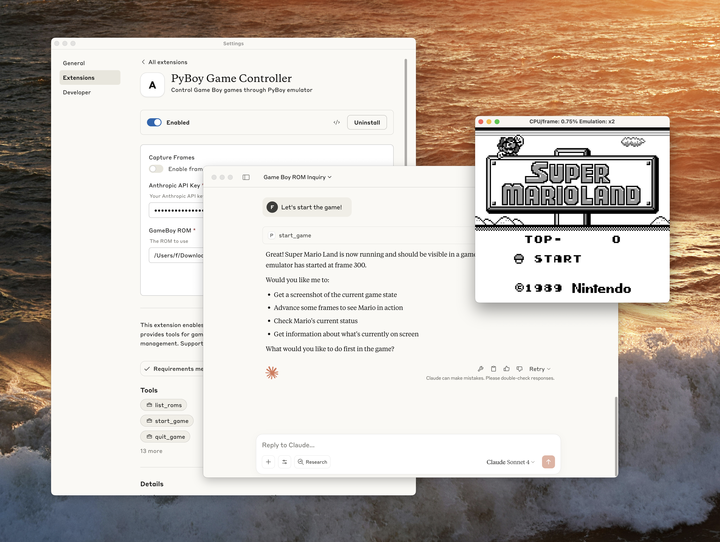
我们迫不及待想看到你会构建什么。曾经带来数千个 MCP servers 的同样创造力,现在只需一次点击,就能触达数百万用户。准备好分享你的 MCP server 了吗?提交你的 extension 以供审核。